
Direct debit
Grant a mandate so invoices are collected from your account automatically.
With direct debit you no longer have to pay invoices yourself. We collect the amount from your account a few days after sending the invoice. The collection date is stated in the invoice email.
Granting a mandate
- Go to My account → Your details and scroll to Direct debit.
- Read the mandate text and tick the box to agree.
- Click Grant mandate (€ 0.01). You make a one-off payment of 1 cent via iDEAL or Bancontact, so the bank can confirm the account is yours.
- Back in the customer panel, Direct debit shows the account number of the mandate.
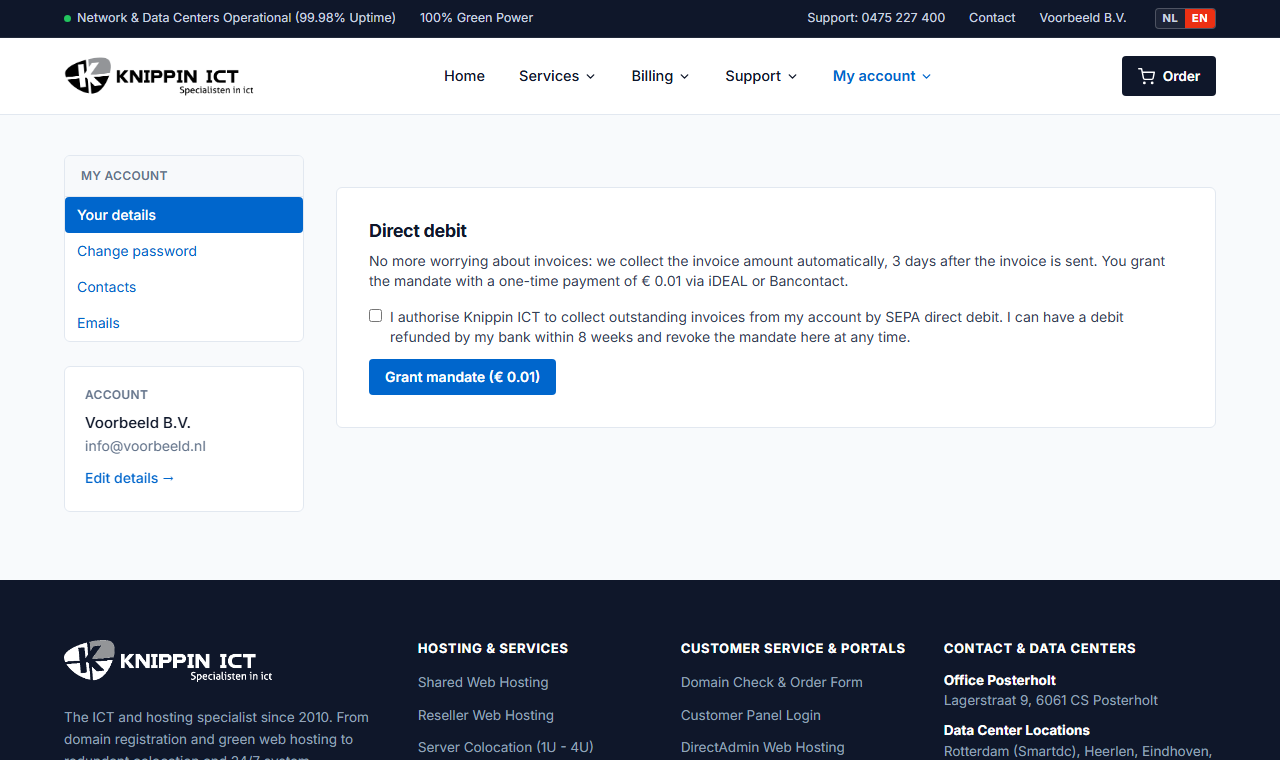
Do you see the message that your mandate is being processed? Refresh the page after a few minutes.
How does it work after that?
- Every new invoice is collected automatically. The invoice email states the date.
- We make one attempt per invoice. If the collection fails, for example due to insufficient funds, you will be notified and pay that invoice yourself via the payment link or a bank transfer. We never collect twice for the same invoice.
- Disagree with a collection? You can have it reversed through your bank within 8 weeks. Please also let us know, so we can sort it out together.
Revoking the mandate
Under Direct debit, click Revoke mandate. From then on you pay invoices yourself again. You can also download the mandate as a PDF for your records.